Google Discover is the lifeblood of the news industry on the internet. Without Google Discover presenting you with the stories it thinks you might be interested in, I’m not sure that half of the news outlets you read would exist today. It plays, in my opinion, the most important role in spreading news, and that’s mostly because you’ve told Google what you like and who you like to read.
I bring this up today in a little reminder/how-to guide on how to make sure your personalized Google Discover is fully functioning, enabled, and actually showing you the stuff you want to read. Why today? Because after changing phones 6 or 7 times in the last month for reviews, my personalized Google Discover feed found itself disabled and presenting me with the absolute worst content. I don’t want this to happen to any of you.
What is Google Discover?
Backing up for a second, for those of you don’t know what Google Discover is, let’s clear that up. Google Discover is the feed of news stories you see when you open the Google App on your Android or iPhone. It also lives off to the left of the home screen on most Android phones and shows up when you open a new tab in Chrome on mobile.
The story suggestions are built off of your browsing history, what you tap on or search for, and what you’ve told it you are interested in seeing. You can favorite items from it, tell it you don’t like a subject or source, and really customize the feed to your liking, at least for the most part.
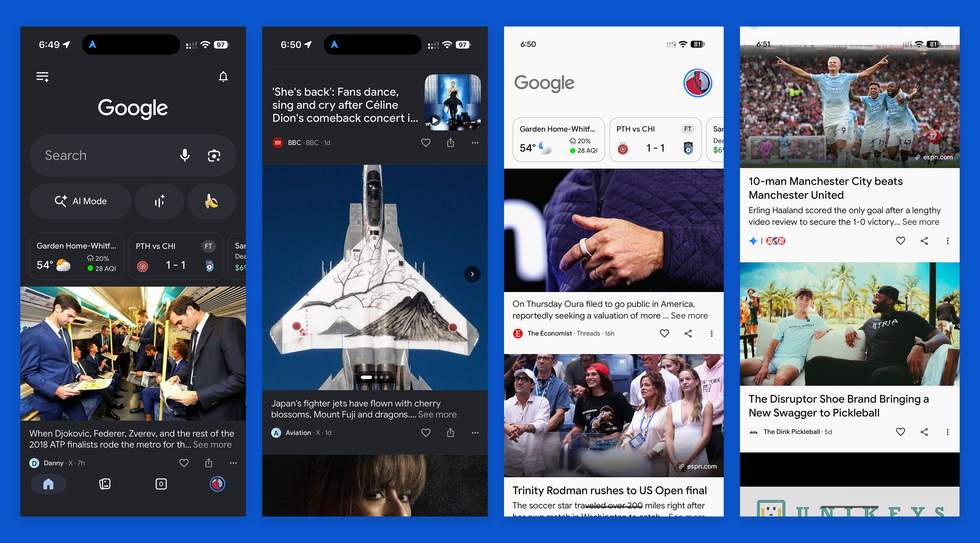
Google has made numerous changes to it over the years, many of them bad, but it still functions and is clearly the driving force for your online reading habits. Again, Google Discover powers the news industry because so many of us get our news from it.
How to fix the Google Discover feed
That out of the way, let’s get back to my original thought here. So, a few weeks back, I noticed that my Discover feed was almost 100% stuff that I wasn’t interested in. It was a mixture of celebrity gossip and political stories from sources I certainly would never read and know that I had told Google to never present them.
I also noticed that content from Droid Life and other tech publications, some gaming feeds I follow, and sports stories for my favorite teams, were completely gone. And I know that I had told Google what exactly I want to see and follow, because it’s a thing I regularly update on Google Discover.
Last week, I finally grew frustrated enough that I went looking for ways to fix, which brought me to the first place I should have looked weeks ago: Search Personalization. It had been turned off on my account.
Again, I’ve changed phones probably 6 or 7 times in the past 2 months, so there’s a chance I turned it off, I just don’t remember doing this. Why would I do this? So, maybe a Google App update did it, or maybe that’s just me coping with my own silly mistake. Anyways, I turned that back on and now things are perfect again in my Google Discover feed.
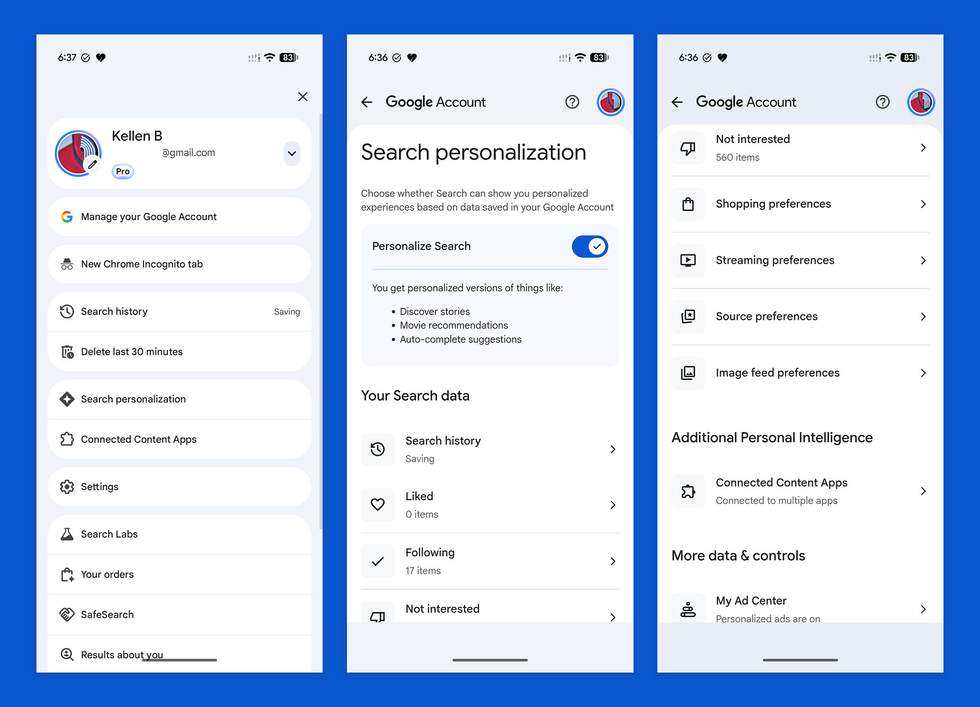
For those of you who want to customize or fix your Google Discover feed, this is where you should start:
- Open your Google App
- On Android, tap on your Profile and look for “Search personalization”
- On iOS, tap your Profile, then the Settings icon (top right corner), and then look for “Search personalization”
- On this screen, make sure it is enabled
To further go down the road of fixing, should your Discover feed be showing content you aren’t interested in, this “Search personalization” page is where you can go to customize.
You’ll find settings for your search history, which it can use to show you content. You’ll also find items you’ve “Liked” from the feed, topics you are following, the section where all of your “Not interested” items live, and more. You’ll also find your shopping, streaming, and maybe most importantly, source preferences.
All of these areas are worth looking through to make sure your Google Discover feed is setup correctly and showing you the content you want to see.
Read the original post: How to Fix Your Google Discover Feed