Google Messages is getting a brand new menu this week and it appears to be rolling out widely. The new menu brings more functionality and easier access, as well as a really neat blur effect when active.
Google has apparently been testing this menu for some time and we all officially received it this week. Users on both stable and beta builds are seeing it, so it is likely here for good.
Now, when you long-press on a message or photo in Google Messages, the background of your conversation will blur and a new floating menu appears with reactions shortcuts, the message you pressed on, and several other actions. There’s also a “Create” button that can be accessed with a slight swipe from right-to-left that’ll let you quickly make stickers.
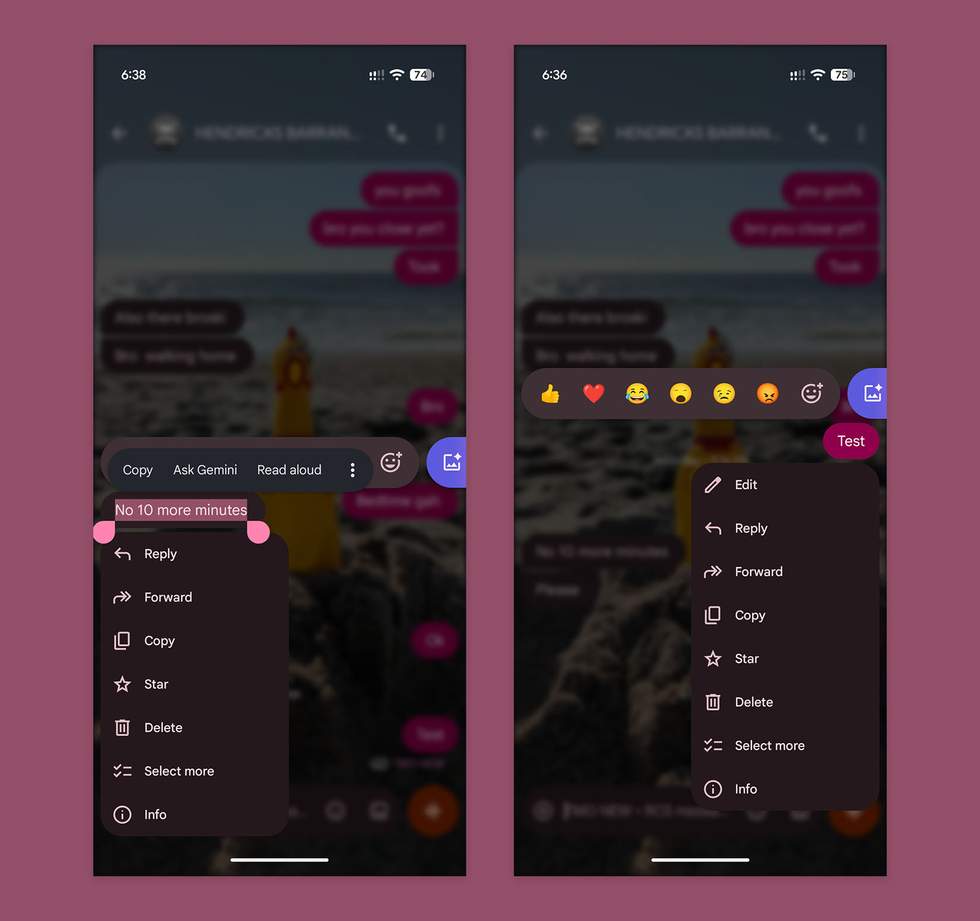
Maybe even more importantly, if you long-press on a text message, you can now precisely copy text from that message rather than just the full thing. Once in the menu, you can then long-press the words to get Android’s typically highlight-copy tool.
Of course, you still have options to Reply, Forward, Copy, Star, Delete, Select more, and Edit. You can also tap the Info option to see when a message was sent, delivered, and that it was encrypted.
I have this new menu on beta version 20260917_03, but folks with stable 20260903_04 are seeing it as well.
Google Play Link: Google Messages
Read the original post: Google Messages Gets a Fancy New Menu