Should you update to iOS 27?
iOS 27 is worth upgrading for users who want a smarter Siri, new AI-powered photo tools, stronger security and faster everyday performance. Owners of the iPhone 15 Pro and newer models will benefit most from Apple Intelligence, while older supported iPhones miss out on some of the more advanced AI features.
iOS 27 arrives on September 14, 2026, bringing one of the biggest upgrades to Siri yet, along with faster performance, new AI-powered photo editing tools, stronger security and a long list of improvements across Apple’s apps.
While iOS 26 introduced headline changes including the Liquid Glass redesign, Call Screening and the first wave of Apple Intelligence features, iOS 27 is more about making the iPhone smarter, faster and more useful. Siri AI is the star of the update, but there are also significant improvements to Photos, Safari, Passwords, parental controls and more.
So, how does iOS 27 compare with iOS 26, what do you actually gain by upgrading, and which iPhones get the biggest improvements? Here’s what you need to know.
iOS 27 vs iOS 26: At a glance
iOS 27 may seem a little light on specific new features, with more focus seemingly given to performance, security and sorting out Siri. Here’s the main improvements Apple announced:
Is Siri better in iOS 27?
Yes: iOS 26 introduced Apple Intelligence features; iOS 27 transforms Siri into a contextual AI assistant with cross-app actions.
Has performance improved?
Yes: iOS 26 focused on features and redesigns; iOS 27 prioritises speed, responsiveness, stability and system optimisation.
What’s new for photos?
iOS 26 added Visual Intelligence screenshot analysis; iOS 27 adds generative editing, expansion and reframing tools.
What’s changed for parents?
iOS 26 introduced improved child protections; iOS 27 adds website approvals, category controls and enhanced monitoring.
Has the design changed?
iOS 26 introduced Liquid Glass; iOS 27 refines it with better readability, clarity and adjustable intensity controls.
iOS 27 vs iOS 26 comparison table
| Category | iOS 27 | iOS 26 |
|---|---|---|
| Siri | Full Siri AI with personal context, cross-app actions and conversational workflows | Basic Apple Intelligence integration, Live Translation, Visual Intelligence |
| Performance | Up to 30% faster app launches, 70% faster photo loading, 80% faster AirDrop | Standard optimisation |
| Design | Refined Liquid Glass with improved readability and adjustable transparency | Introduced Liquid Glass interface |
| Photos | AI image expansion, object removal, Reframe and enhanced Image Playground | Visual Intelligence screenshot analysis |
| Phone | Call Context surfaces relevant emails, messages and information during calls | Call Screening, Hold Assist, voicemail summaries |
| Security | Automatic password replacement for compromised accounts | Password management improvements |
| Parental Controls | Ask to Browse, category-based limits and expanded safety protections | Ask to Buy and Communication Safety |
| Games | Largely unchanged | New dedicated Games app |
| AI Features | Next-generation Apple Intelligence powered by Siri AI and Gemini integration | First wave of Apple Intelligence features |
| Focus | AI, performance, security and reliability | New features and redesign |
What are the best new features in iOS 27?
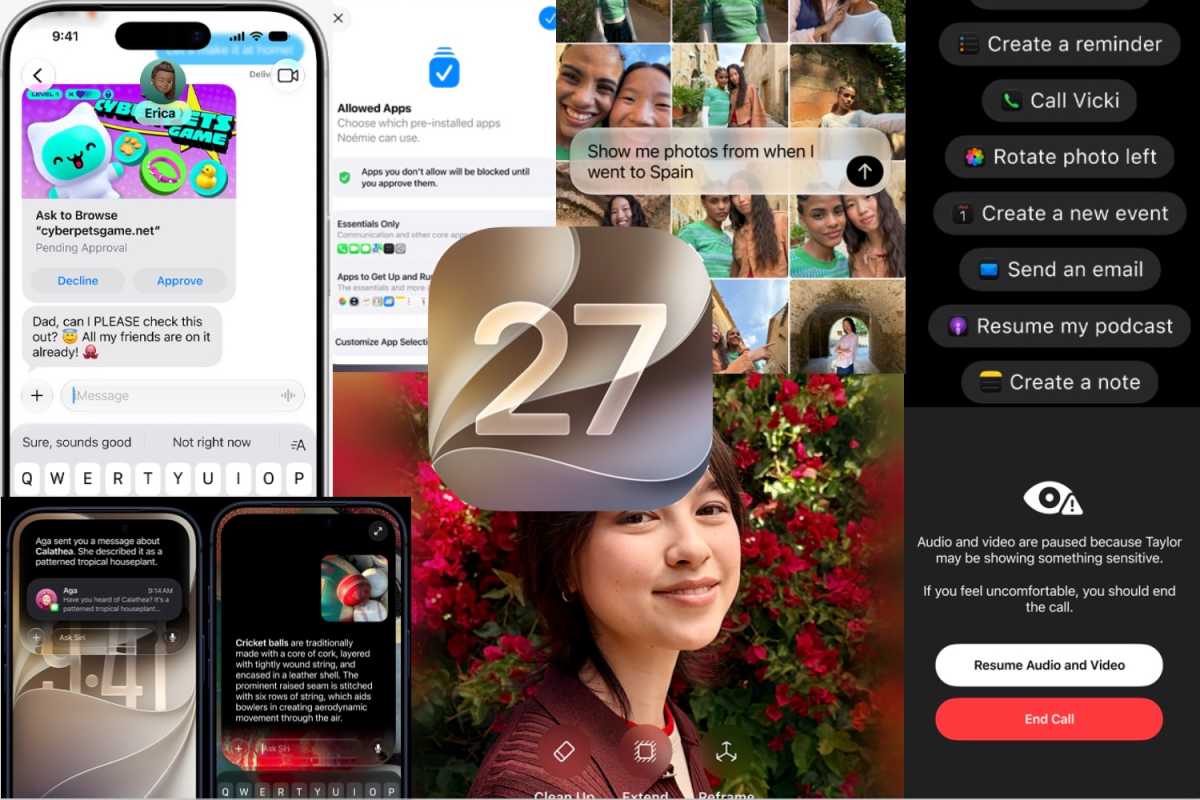
New features coming in iOS 27
Foundry
- Better Siri
Siri AI is the headline upgrade. It will understand personal context, search messages, photos and emails, perform actions across apps, follow conversational requests and remember previous interactions. It will be able to find information buried in your communications, create reminders and complete multi-step tasks without switching between apps. - Automatic fix for compromised passwords
One of the most practical additions. Siri will be able to identify compromised passwords stored in the Passwords app, sign into supported services, generate stronger replacements and save them automatically. If it works as demonstrated, it removes one of the biggest barriers to improving online security. - New AI photo editing features
Photos gain powerful generative editing tools. Users can expand image borders beyond the original frame, remove larger unwanted objects more naturally, and use Reframe to change image perspective while AI fills newly created areas. Image Playground also gains more advanced image generation and style transformations. - A faster iPhone
Apple says app launches are up to 30% faster, photo libraries load up to 70% quicker and AirDrop transfers can be up to 80% faster. Unlike iOS 26’s feature-heavy release, iOS 27 puts significant emphasis on performance, stability and day-to-day responsiveness. - New safety features for families
Parental controls will become much more granular. Parents will be able to set separate limits for games, entertainment and social media, approve access to unfamiliar websites through Ask to Browse, and benefit from expanded Communication Safety protections that help block sexual or violent content.
When will iOS 27 be released?
Apple released iOS 27 on September 14, 2026, as a free software update for compatible iPhones. If you are reading this on that day, we expect it to be available from 10am P.T., 6pm in the U.K.
The update includes most of the features Apple previewed at WWDC in June, including the new Siri AI, although availability varies by device, language and region. Siri AI is initially rolling out as a beta for supported devices set to English, with French, Japanese, Korean, Portuguese and Spanish support due in October.
Which iPhones will support iOS 27?
iOS 27 is compatible with the following iPhones:
- iPhone Duo
- iPhone 18 Pro Max, iPhone 18 Pro
- iPhone Air
- iPhone 17 Pro Max, iPhone 17 Pro, iPhone 17, iPhone 17e
- iPhone 16 Pro Max, iPhone 16 Pro, iPhone 16 Plus, iPhone 16, iPhone 16e
- iPhone 15 Pro Max, iPhone 15 Pro, iPhone 15 Plus, iPhone 15
- iPhone 14 Pro Max, iPhone 14 Pro, iPhone 14 Plus, iPhone 14
- iPhone 13 Pro Max, iPhone 13 Pro, iPhone 13, iPhone 13 mini
- iPhone 12 Pro Max, iPhone 12 Pro, iPhone 12, iPhone 12 mini
- iPhone 11 Pro Max, iPhone 11 Pro, iPhone 11
- iPhone SE (2nd & 3rd generation)
One thing to note is that the most advanced on-device AI models will be restricted to iPhone 15 Pro and Pro Max and iPhone 16 models or later. This is linked to the amount of RAM available, and you’ll only miss out on some of the new Siri voice models and dictation accuracy.
Everything new in iOS 27
Apple
When iOS 26 launched in September 2025, it introduced major changes including the Liquid Glass redesign, a revamped Phone app, and new Apple Intelligence features such as Call Screening, Live Translation, voicemail summaries and Hold Assist. Apple also added a dedicated Games app, redesigned the Camera app and expanded Visual Intelligence with screenshot analysis and ChatGPT integration. Read our comprehensive iOS 26 guide for more information.
By comparison, iOS 27 focuses less on introducing entirely new features and more on improving Siri, boosting performance, enhancing security and expanding AI capabilities. Here are the biggest changes coming later this year.
An even better Siri
A large chunk of Apple’s keynote was taken up with the new, improved version of Siri. Powered by the next generation of its Apple Intelligence models (which now combines with Google’s Gemini technology) Siri AI will bring some advanced features to the platform when it arrives later this year.
The new models use two main information pools – Personal Context understanding (all the data stored on your iPhone) and Broad world knowledge (all it can draw from the web) – combining to provide a complete picture of what you’re looking for or want to do.
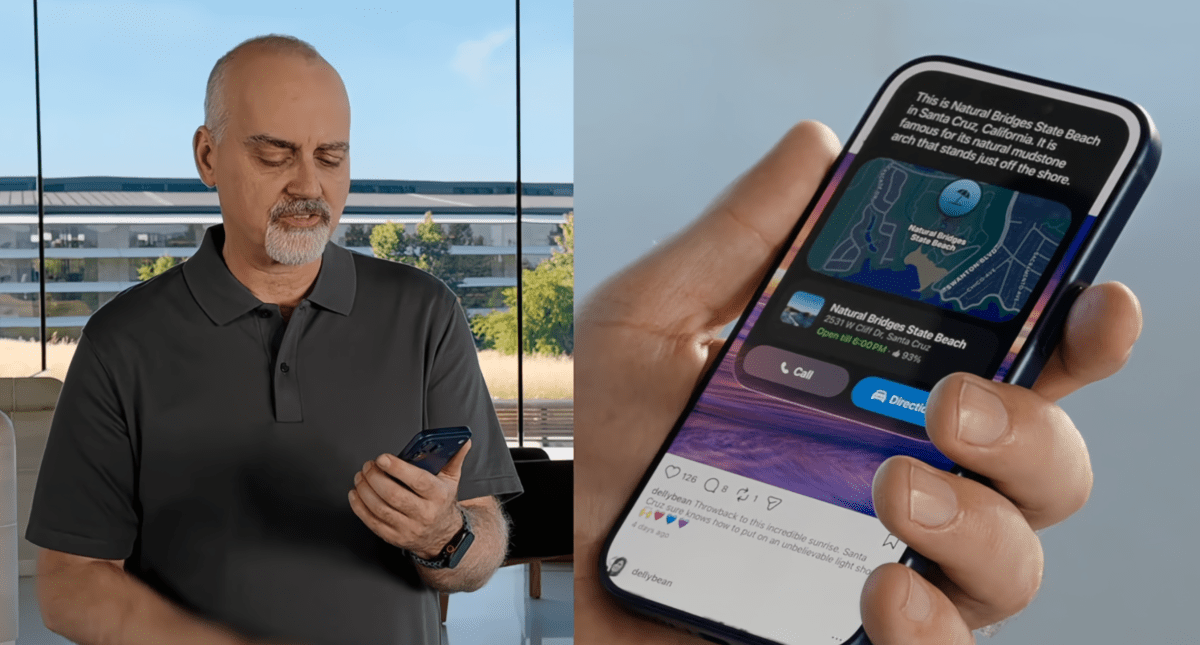
Thanks to deep integration into the OS itself, and in particular Apple apps like Mail, Messages and Photos, Siri AI will be able not only to answer questions in a conversational manner, but it can also monitor communications you have and then offer context-based actions.
Apple
Say you exchange a few emails with a friend about a potential meet-up. Siri AI can surmise from the text what’s going on, then offer to create a Calendar entry for the relevant time and date, all without you needing to ask for anything.
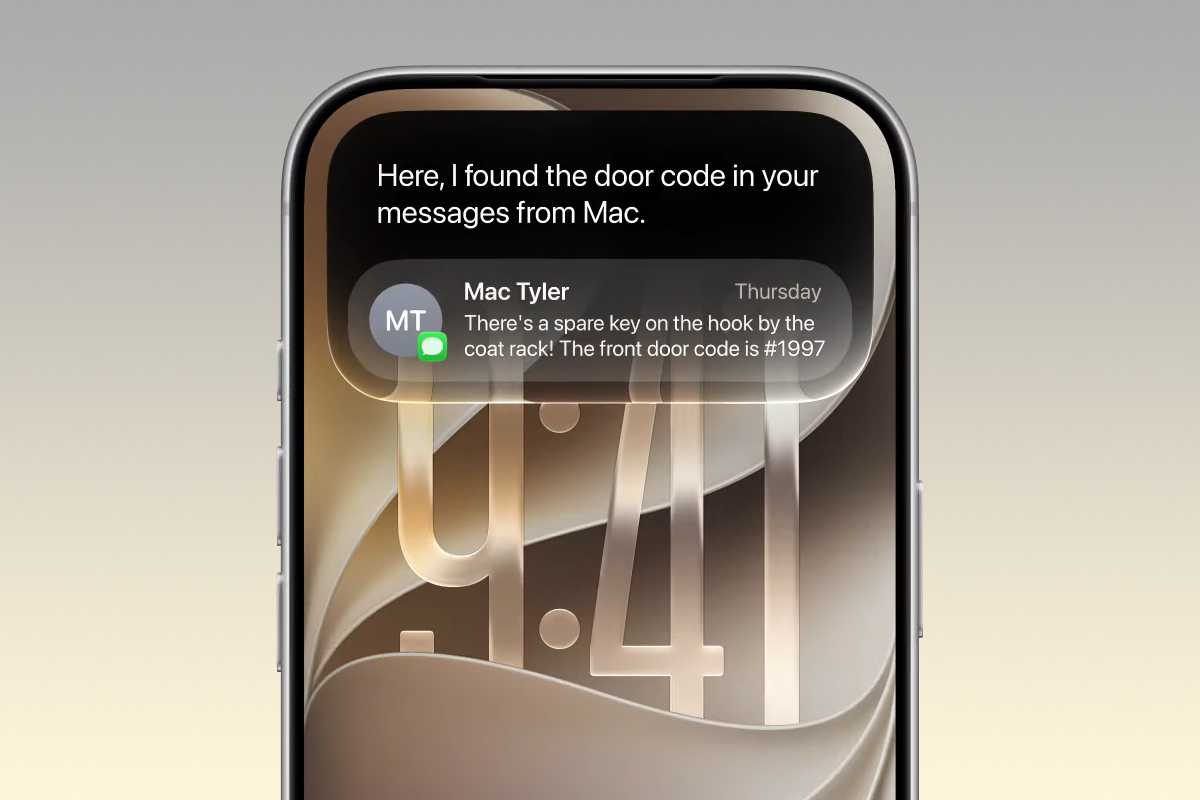
It should also be able to find photos or things mentioned in messages just by you asking it to track them down. For example, if someone sent you a message about a new TV show they thought you would like, but you can’t remember what it was, you can simply ask Siri AI ‘Hey, what TV show did Paul say I should watch?’, which will trigger a search through your conversations to find the answer.
In the demonstration, Apple also showed how the new Siri AI functionality works across multiple Apple applications. For instance, in one section we saw Siri AI being asked when a certain performer’s concert was coming up. Then, it was asked how to buy tickets, with the answer showing that there was a lottery draw. The demonstrator then told Siri AI to set a reminder for when the lottery would begin, while also playing a song from the artist in Apple Music. This was all seamlessly in the conversation, rather than a separate set of tasks.
In another example, Siri AI was asked where a contact’s new address was? This was found in a Message, then it was instructed to plot the journey there in Apple Maps, which it did without issue.
Apple
Other features include Call Context, where Siri will automatically bring any relevant information to your attention when you’re on a call with someone. So, if you call a builder you’ve arranged some work with, Siri will show you the emails exchanges and any other data it thinks you might need for the conversation.
There seems to be plenty of scope for the new Siri AI, and it will accessible either by the normal voice command, swiping down from the Dynamic Island or holding the Side Button for longer interactions. You’ll also be able to see all your previous interactions and conversations in the new dedicated Siri app, which syncs across all your Apple devices.
Ok, we’ve been burned in the past with Apple’s AI promises, but the focus on this year seems to be more on making the basics work well and that could be what most people actually want. One caveat is that due to an ongoing disagreement with the EU, countries in the Union won’t be able to get Siri AI on iPhone or iPad at launch.
Automatic password fix
While this falls into the standard remit of Siri AI, it does feel like it needs its own section, as Apple announced that the new powers gifted to its digital assistant would enable it to do something very useful. Provided you keep your login details to all your accounts and sites in the Apple Passwords app, you can instruct Siri to find any compromised passwords, log in to the revenant service and change them automatically to a new, safer one. These would then be stored in the Passwords app and your details would be secure once more.
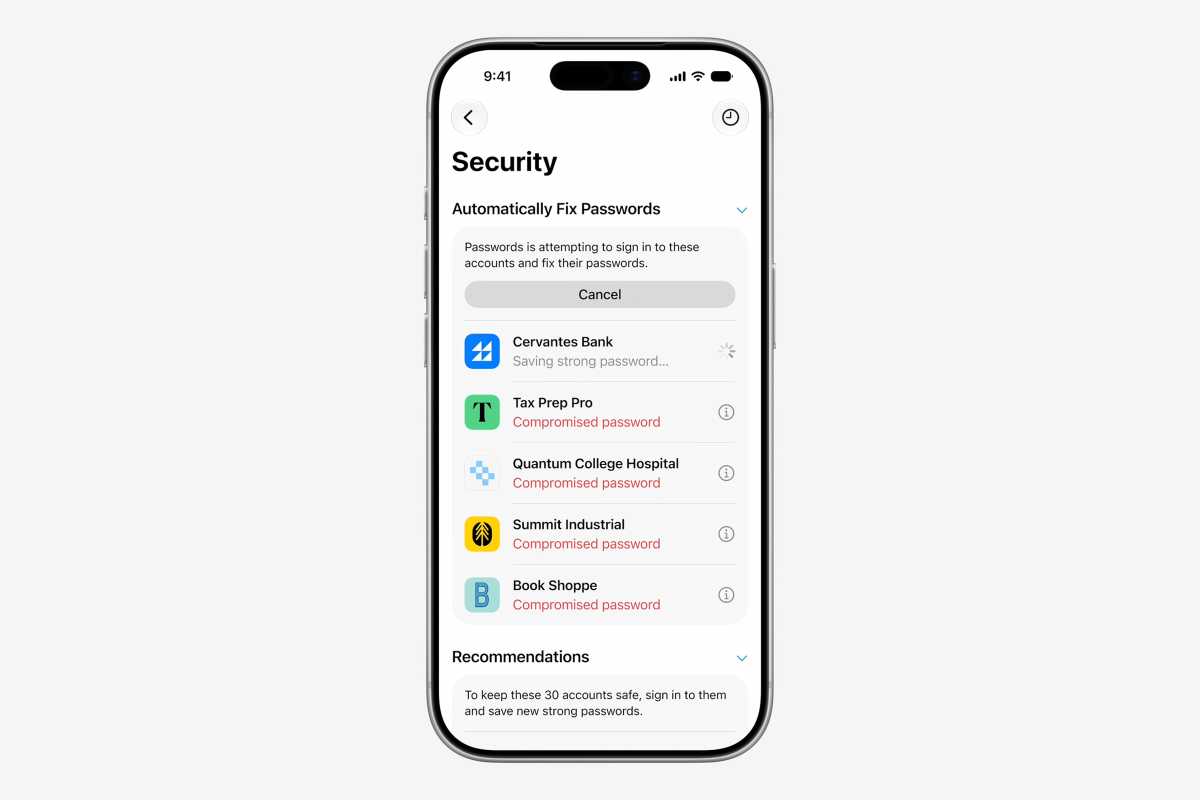
Siri will look after changing your password.
Apple
If this works then it could be a game changer, as the painful truth is that most of us ignore this important job as it would just take too long.
New AI photo editing features
Apple showed off some pretty impressive photo features powered by the new AI models in iOS 27. When the update arrives you’ll be able to take existing images and have Siri increase the area of the image by up to 25%, with the new surrounding parts auto-generated by the system to match the rest of the image. It’s like zooming out and finding that there’s more to the image than you first thought.
You can also clean up parts of images with more powerful tools that can remove large objects while still persevering the look of the photo. Perhaps the most stunning though is Reframe, which lets you take an existing image and change its perspective, with the new areas filled in by AI generated content. Essentially, you can pan around the subject and Siri will magically make it look real.
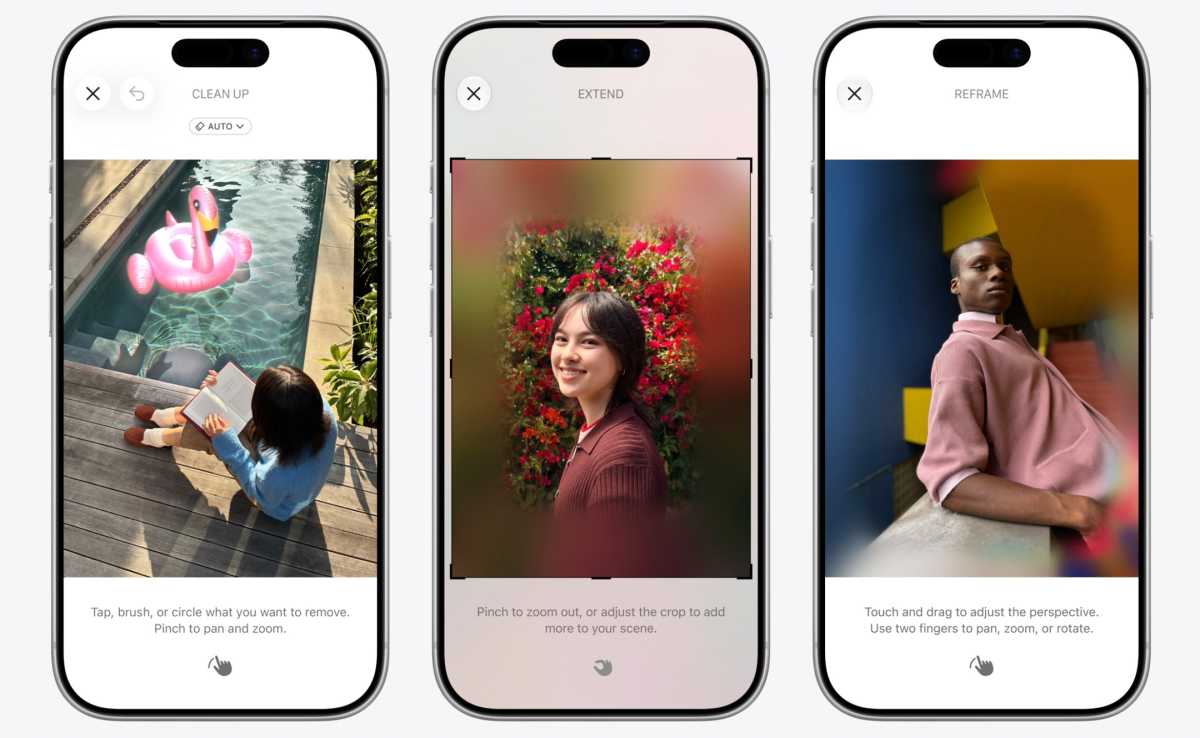
Use AI to make your photos even better.
Apple
Image Playground has also been revamped so you can create images from prompts as well as change photos into a variety of styles just by asking Siri AI.
New child safety features
Apple takes privacy and safety seriously, and that extends to younger users. With iOS 27 you’ll now have expanded control over Screen Time for your kids, with the three main areas of Entertainment, Games, and Social Media all having granular times limits and schedules that you can set to prevent little ones from spending too much time on their devices.
Dedicated Child Accounts come with guidance on the kind of usage is heathy for children, with Apple working alongside the American Academy of Pediatrics to give parents and idea of what is appropriate for their kids. The controls also change as the child gets older, allowing my precise controls rather than blanket settings.
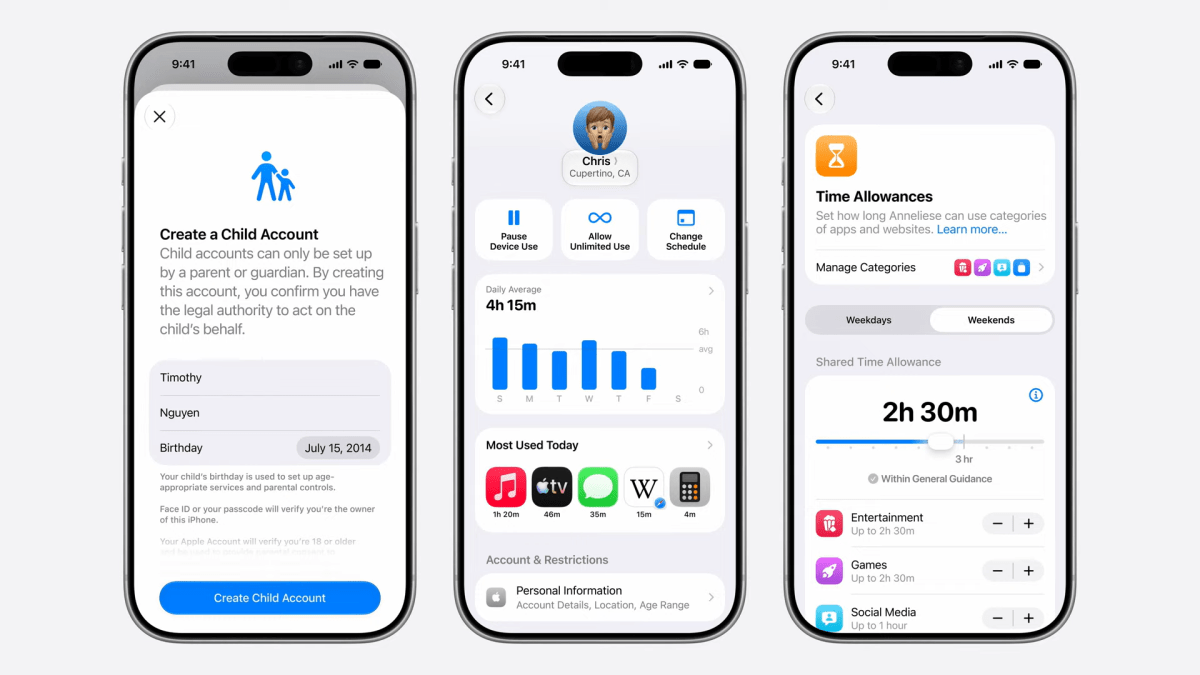
Apple
Alongside the Ask to Buy feature already present in iOS 26, where children can send a message to their parent asking permission to make app purchases, iOS 27 adds Ask to Browse, which prevents the child from opening a website they haven’t used before until they get permission.
Communication Safety will now also monitor any messages coming in or out of the child’s device, preventing any sexual or violent images from being able to be seen, received or sent.
Liquid Glass and design tweaks
One of the biggest changes in iOS 26 was the introduction of the Liquid Glass graphical interface. This wasn’t entirely met with cheers and adoration, so Apple has done some work and brings needed fixes in iOS 27. These include subtle redesigns, such as frosted menu bars across the top of sections of the interface where there are controls. This should help with legibility, as will some of the other colour and clarity adjustments that Apple announced. There will also be a slider in the Settings that allows you to manually change the level of the effect on the interface.
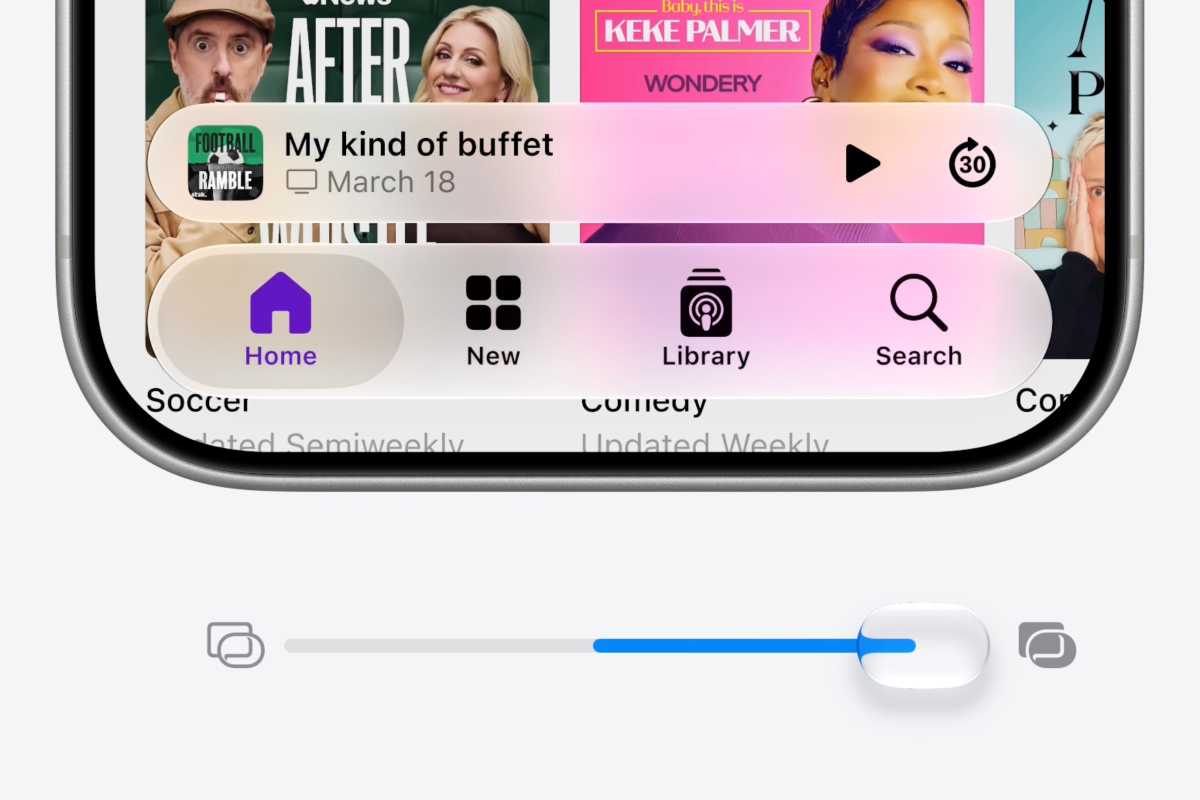
Apple
Performance is set to get an upgrade too, with Apple promising plenty of enhancements to the underlying engine. It claims that iPhone apps will launch 30% faster, new photos load into libraries up to 70% quicker, and AirDrop gets the biggest boost as transfer times could be reduced by up to 80%.
What else is new?
Since Apple first previewed iOS 27, we’ve learned more about some of the smaller improvements included in the final release. These include Enhanced Flyover in Maps, Custom EQ controls for AirPods, new Apple Intelligence features in the Home app, including smarter camera notifications and HomeKit Secure Video search, and GymKit support on the iPhone.
iOS 27 also introduces special interface features for Apple’s new iPhone Duo, including support for side-by-side apps and layouts that adapt as the foldable iPhone is opened, closed or repositioned.
iOS 27 vs iOS 26: Is it worth upgrading?
Apple went hard on AI when the iPhone 16 launched, but the rollout of Apple Intelligence didn’t go as smoothly as expected, with some features delayed and others taking longer than anticipated to arrive.
With iOS 27, Apple is taking another big step toward delivering on that original promise. The biggest draw is the much smarter Siri, alongside new Apple Intelligence features, faster performance, stronger security and improvements across many of Apple’s apps.
If you have an iPhone that supports Apple Intelligence, particularly an iPhone 15 Pro or newer model, iOS 27 should be a worthwhile upgrade. Older supported iPhones still benefit from many of the other improvements, but they miss out on some of the more advanced AI features.
For a more detailed look at everything included, see our comprehensive iOS 27 guide.